Integer Atlas: an open, queryable atlas of integer properties
Integer Atlas is an open, versioned, queryable dataset of number-theoretic properties of the integers — things like the prime factorization of n, the number of distinct prime factors ω(n), Euler’s totient φ(n), the divisor sum σ(n), the Collatz stopping time, and dozens more. You compute it in shards, verify every shard independently, and query the result with plain SQL.
This post is a manual. It covers three audiences:
- The consumer — you just want the data and a SQL prompt.
- The contributor — you want to compute and submit shards.
- The standalone user — you want the compute engine as a Python package, no CLI.
There’s also a section on the hosted notebook UI, with example plots.
One variable to know up front —
INTEGER_ATLAS_HOME. The CLI keeps everything it downloads in a single workspace directory: a cached copy of the registry, the shard files, andatlas.duckdb. That directory is$INTEGER_ATLAS_HOMEif you set it, otherwise~/.integer-atlas. It matters in two ways: it’s where your data lives, and the UI must point at the sameINTEGER_ATLAS_HOMEas the CLI —atlas.duckdbstores absolute paths to the shard files, so both sides have to agree on the location. Not sure where yours is (or forgot you set it)? Runinteger-atlas status— it prints the resolvedworkspaceand the exactdatabasepath on disk.
The four repositories
Integer Atlas is deliberately split into four small, independent repos. None of them import each other; they communicate through files and a small command surface.
| Repo | What it is | You touch it when… |
|---|---|---|
integer-atlas-algos |
The property definitions + a stateless compute engine (atlas-algos). Published to PyPI. |
You compute or verify data, or use the math standalone. |
integer-atlas-cli |
A single Go binary (integer-atlas) with embedded DuckDB. The one tool a consumer needs. |
You fetch and query data, or orchestrate a contribution. |
integer-atlas-shards |
A pointer repo: work orders (pending/) and accepted manifests (accepted/). No data lives here. |
You claim work or submit a shard via pull request. |
integer-atlas-ui |
A JupyterHub stack (Docker) for notebooks and dashboards over the same data. | You want to explore visually. |
A note on the data model: a shard is a Parquet file covering a contiguous range of n and a set of columns. A manifest is a small JSON pointer describing a shard (its range, columns, storage URL, and hashes). The Shards repo stores only manifests; the Parquet files themselves live in object storage.
Pick your path: want data → Consumer. want to do the math yourself in Python → Standalone. want to contribute data → Contributor. want plots → Notebook UI.
1. Consumer: install, fetch, query
Install the CLI. The installer detects your platform and asks what you want; choose SQL-only (no Docker) to just fetch and query.
curl -fsSL https://raw.githubusercontent.com/outcompute/integer-atlas-cli/main/install.sh | sh
The CLI keeps a local workspace at $INTEGER_ATLAS_HOME (default ~/.integer-atlas):
its config, a cached copy of the Shards repo, downloaded shards, and atlas.duckdb.
See what data exists. packs lists the column groups present in accepted shards and
the ranges they cover; describe explains a single column.
integer-atlas packs
integer-atlas describe omega_big
Fetch and query. fetch downloads the shards for your request, verifies their
hashes, and loads them into the local DuckDB. Then sql gives you a read-only SQL prompt
over a numbers view (keyed on n).
integer-atlas fetch factor --start 1 --end 1000000   # a whole pack over a range
# or by column: integer-atlas fetch --columns omega_big --start 1 --end 1000000
integer-atlas sql "SELECT omega_big, count(*) FROM numbers GROUP BY 1 ORDER BY 1"
Export instead of printing with --format and --output:
integer-atlas sql --format parquet --output out.parquet "SELECT n, euler_phi FROM numbers"
Run integer-atlas sql with no query to drop into a REPL. Use integer-atlas status to
see what’s fetched and loaded, and integer-atlas doctor if something looks off.
Availability: the dataset currently covers n = 1 … 100,000,000 for all column groups (
core,repr,factor).packsshows exactly what’s published; you can also compute ranges yourself (next section) andsideloadthem.
2. Standalone: the Algos package
The compute engine is a normal Python package with no dependency on the CLI or the other repos. This is the path if you just want the number theory in your own pipeline.
Install (the parquet extra pulls in pyarrow for the default Parquet output; add
hash for the native-speed BLAKE3):
pip install "integer-atlas-algos[parquet]"
This gives you the atlas-algos command. List every available column:
atlas-algos columns
Describe a unit of work. The engine is stateless: every run is a pure function of a small work-order JSON that names a range and the columns you want.
{
  "id": "demo-1-1000",
  "start": 1,
  "end": 1000,
  "columns": ["prime_factors", "omega_distinct", "euler_phi", "is_prime"]
}
Save that as demo.json. Preview the cost without computing:
atlas-algos compute --manifest demo.json --out demo.parquet --dry-run
Then compute the shard. The run is chunked, shows progress, and is safe to Ctrl-C — rerun the same command and it resumes from the last checkpoint.
atlas-algos compute --manifest demo.json --out demo.parquet
(Prefer text? add --format csv. List columns become a JSON array in CSV, and a native
list column in Parquet.)
Verify what you produced — recompute a sample and compare. --degree 1.0 checks
every row:
atlas-algos verify --manifest demo.json --shard demo.parquet --degree 1.0
Query it with anything that reads Parquet. The prime_factors column is a real list
of integers:
duckdb -c "SELECT n, prime_factors FROM 'demo.parquet' WHERE n = 360"
-- 360  [2, 2, 2, 3, 3, 5]
Or count the most common prime factors by unnesting the list:
duckdb -c "SELECT UNNEST(prime_factors) AS p, count(*) c FROM 'demo.parquet' GROUP BY p ORDER BY c DESC LIMIT 5"
3. Contributor: compute and submit a shard
Note: All the pending shards have now been computed.
Contributing means computing a shard that fills a published gap, verifying it, uploading the Parquet to storage, and opening a pull request that adds its manifest. The CLI orchestrates all of this for you.
1. Find a hole. Work orders the project wants computed live in the Shards repo’s
pending/:
integer-atlas work
The above command should produce an output similar to
$ integer-atlas work
ID                                         RANGE                    COLS  EST
T-core-1-1000000                           1..1000000               19    -
T-core-10000001-20000000                   10000001..20000000       19    -
T-core-1000001-2000000                     1000001..2000000         19    -
T-core-20000001-30000000                   20000001..30000000       19    -
T-core-2000001-3000000                     2000001..3000000         19    -
T-core-30000001-40000000                   30000001..40000000       19    -
T-core-3000001-4000000                     3000001..4000000         19    -
T-core-40000001-50000000                   40000001..50000000       19    -
T-core-4000001-5000000                     4000001..5000000         19    -
T-core-50000001-60000000                   50000001..60000000       19    -
T-core-5000001-6000000                     5000001..6000000         19    -
2. Compute it. Any of the shards listed above can be computed with the compute
command. Pick any of the ID strings from the above output that you want to compute.
compute --task <id> resolves the work order, shows the estimate,
creates the shard, and writes a draft manifest with hashes, row count, columns, and the
algorithm release already filled in. (It’s resumable, same as standalone.)
Say you chose T-numbers-1-1000000, then the command looks like this:
integer-atlas compute --task T-numbers-1-1000000
This command, with the example you chose above, will product two files in the directory you were in as you executed the command: T-core-1-1000000.parquet and T-core-1-1000000.parquet.manifest.json.
3. Verify before you submit. You can verify the compute results you produced by doing a random sampling. The degree parameter assumes a values between 0-1, where 0 means no samples, and 1 means all the samples, and you can adjust the behaviour by choosing a value between those two ranges, inclusive. So for the above example, the command would look like this, assuming you are in the same directory still.
integer-atlas verify --manifest ./T-core-1-1000000.parquet.manifest.json --degree 0.4
which should produce an output like this
sha256+sha512+blake3 ok
YYYY-MM-DD HH:MM:SS,SSS INFO executor.verify: verify pass: checked 400000/1000000 rows at degree 0.400, 0 failure(s)
{"status": "pass", "degree": 0.4, "checked_rows": 400000, "sampled": 400000, "row_count": 1000000, "failures": []}
4. Test locally (optional). Load it into your DuckDB as a side table without touching canonical data:
integer-atlas sideload --manifest ./<draft>.json
5. Submit. Upload the Parquet file to your storage, then have the CLI fill in the URL and metadata and print the final manifest plus a ready-to-paste PR body:
integer-atlas submit --manifest ./<draft>.json --url https://your-storage/shard.parquet \
  --author "Your Name" --license CC-BY-4.0
Open a pull request against integer-atlas-shards and paste the body. The CLI never
writes to GitHub — you stay in control of the PR.
Maintainer side
Maintainers author the work orders and accept submissions.
-
Author work orders by tiling a range into uniform cells with the planner:
python scripts/plan.py --start 1 --end 1000000 --shard-size 1000000 \ --columns "$(atlas-algos columns --csv)" --table core - On each PR, CI runs
scripts/validate.py(schema + range checks) andscripts/verify.py(downloads the shard the PR adds, checks SHA-256, runsatlas-algos verify). - On merge, the shard is live immediately: PRs add the manifest straight to
accepted/, so there’s no separate promote step. Consumers canfetchit right away.
There’s no formal range-claiming; duplicate work simply surfaces as a conflict in review.
4. Explore in the notebook UI
The UI repo is a JupyterHub stack assembled from off-the-shelf tools (no custom service).
It reads the very same atlas.duckdb the CLI populates.
Bring it up:
git clone https://github.com/outcompute/integer-atlas-ui
cd integer-atlas-ui
cp .env.example .env
# edit .env: set INTEGER_ATLAS_HOME to the SAME absolute path you used with the CLI
# (a literal path under your home directory), and set JUPYTERHUB_PASSWORD.
docker compose --profile build build     # build the hub + single-user images (first run)
docker compose up -d                     # then open http://localhost:8000
Open http://localhost:8000, log in with any username and the password from .env, and
open notebooks/explore.ipynb. The notebook connects read-only with a one-liner:
import atlas
con = atlas.connect()          # opens atlas.duckdb read-only
con.sql("SELECT count(*) FROM numbers")
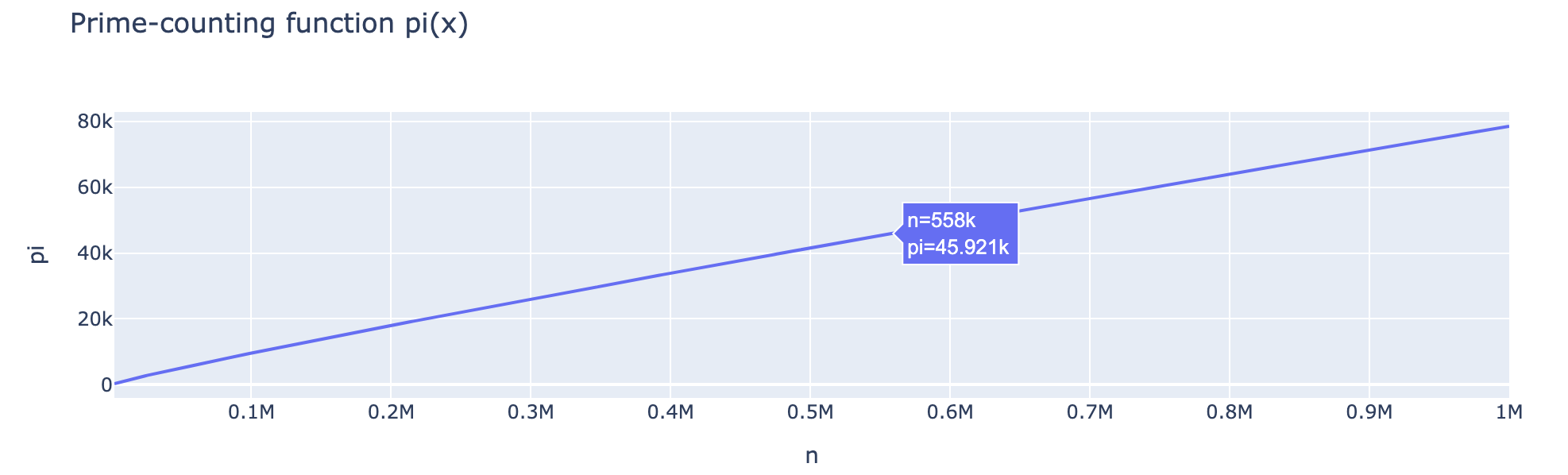 π(x) and the thinning density of primes, straight from the
 is_prime column.
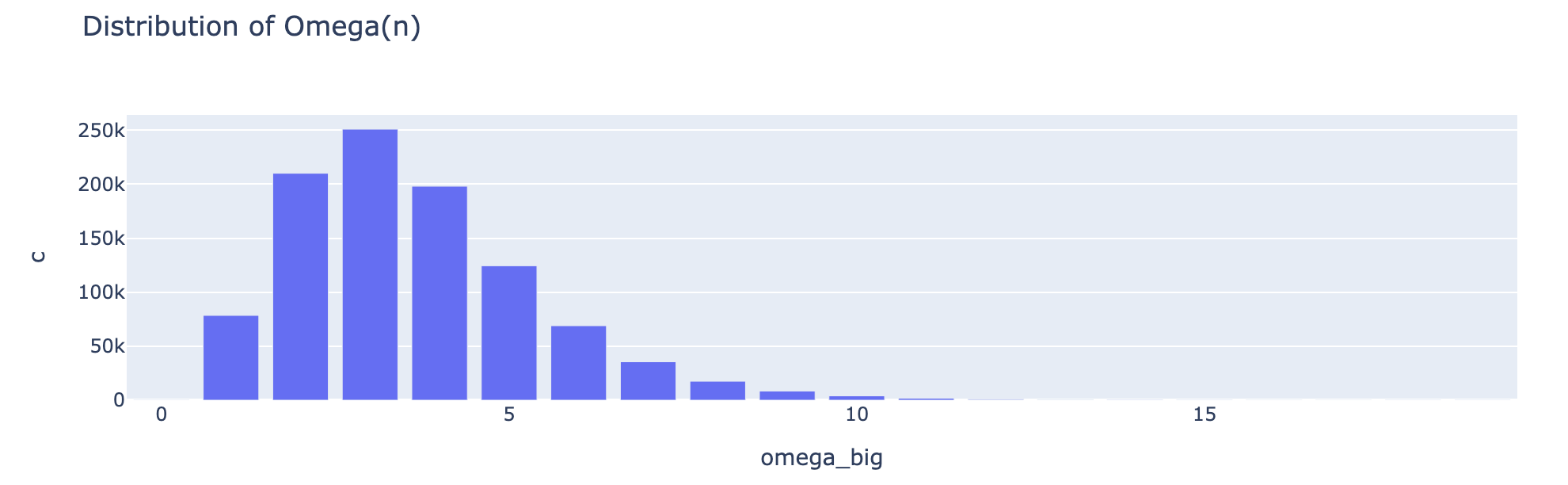 The number of prime factors Ω(n) is asymptotically normal — the Erdős–Kac theorem, visible in
 omega_big.
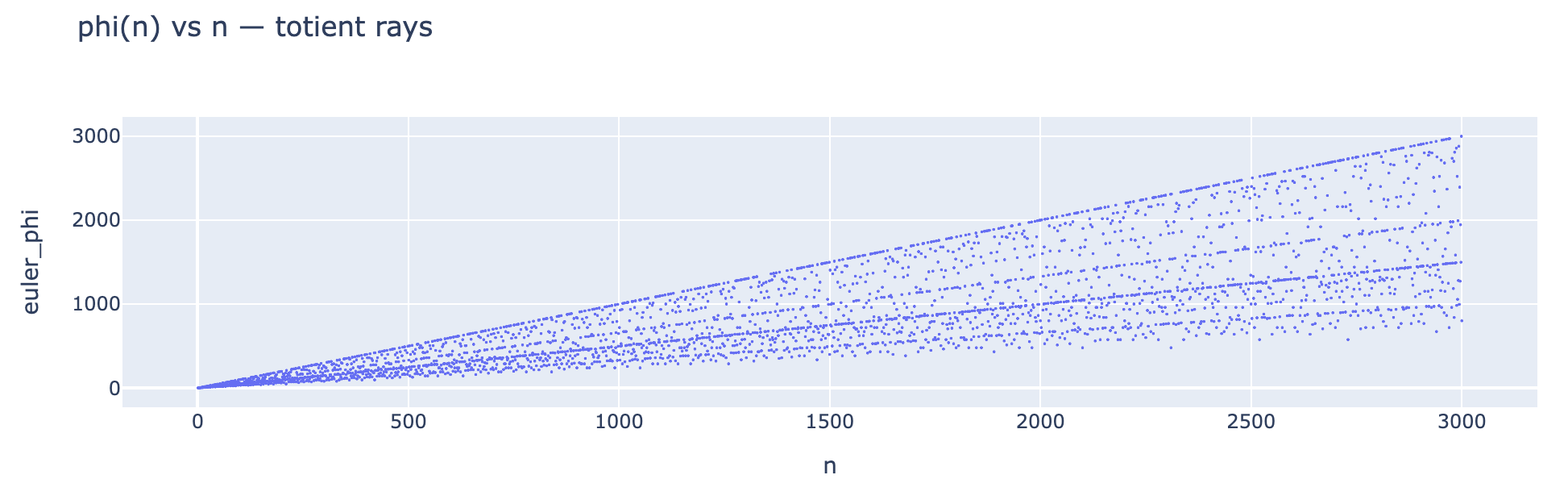 φ(n) plotted against n, showing the totient’s fan of rays.
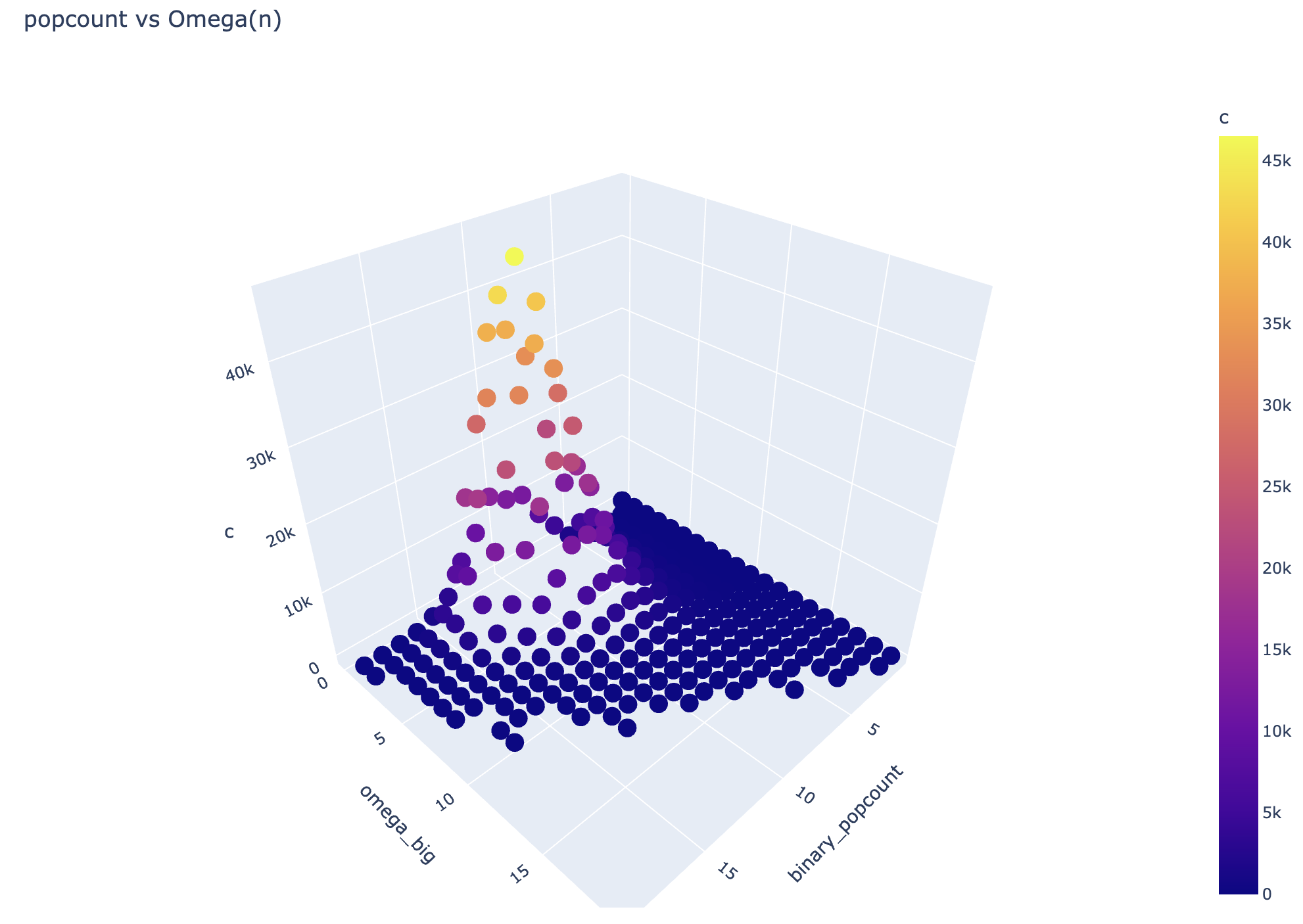 A 3D cross-section of
 binary_popcount against Ω(n).
The notebook also covers squarefree density converging to 6/π², the Mertens function,
abundant/perfect numbers, and Collatz trajectories — all as plain SQL over numbers.
Reference
- Columns. 47 properties, one per file in the Algos
properties/directory. Runatlas-algos columnsfor the full list, orinteger-atlas describe <column>for one. - Work-order shape.
{ id, start, end, columns, algorithm_release }. - Where state lives. Algos is stateless. Work orders and manifests live in Shards. Parquet shards live in object storage. The CLI’s local workspace caches everything.
- Exit codes (CLI).
0ok ·2bad usage ·3nothing found ·4verification failed ·130interrupted. - License. Code is MIT; the dataset is CC BY 4.0 (use freely, attribute). Each repo carries a
CITATION.cff.
Questions, gaps, or a column you wish existed? Open an issue on the relevant repo — and if
you want to add a property, drop a single file in integer-atlas-algos/properties/ with
its metadata and test vectors, and send a PR.